


Reactive IT Support vs. Proactive IT Management
Technology problems can interrupt operations, frustrate employees, and create unexpected expenses. Choosing between reactive IT support and proactive IT management can determine how often these disruptions occur and how quickly they are resolved.
The key difference is simple: Reactive IT support fixes problems after they happen, while proactive IT management focuses on preventing issues through continuous monitoring, scheduled maintenance, security updates, and planning. For businesses that depend on reliable technology, a proactive approach can reduce avoidable downtime and improve long-term IT performance.
What Is Reactive IT Support?
Reactive IT support follows a break-fix model. When a computer crashes, a server stops responding, or an employee cannot access email, the business contacts an IT technician.
The technician investigates the problem and works to restore service.
This approach may suit very small businesses with limited technology needs.
However, it has disadvantages:
- Problems are discovered after employees are affected.
- Emergency repairs may result in unexpected costs.
- Security vulnerabilities may remain unnoticed.
- Recurring problems may not receive long-term solutions.
- Business owners may have little visibility into overall system health.
For a busy Manhattan office, even a few hours without access to critical files can disrupt client service and productivity.
How Does Proactive IT Management Work?
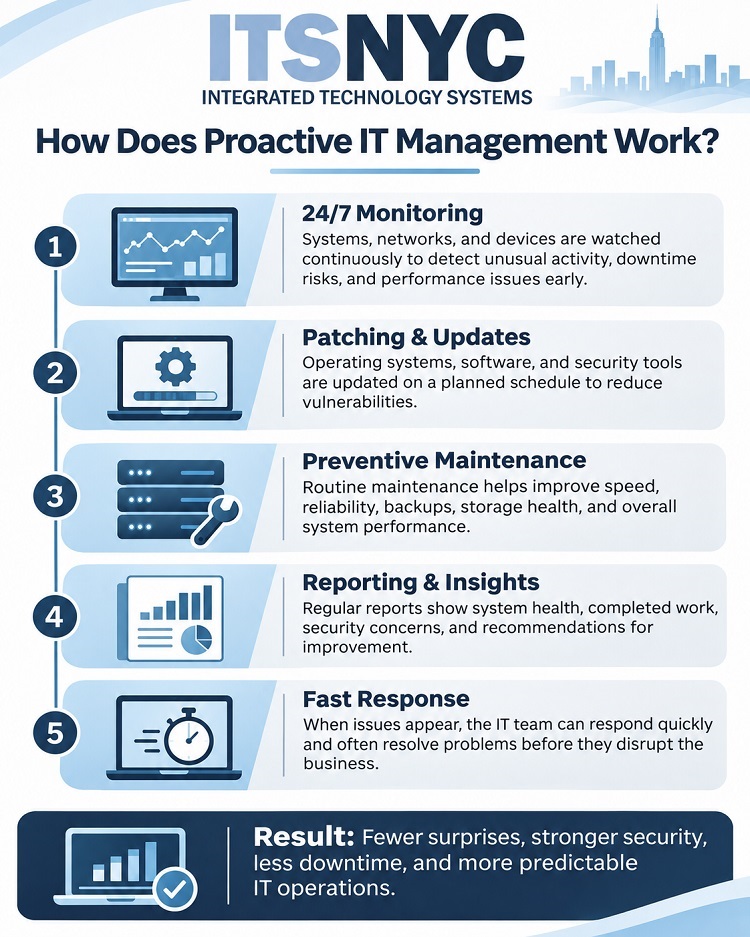 Proactive IT management takes a preventive approach. Instead of waiting for employees to report problems, an IT provider monitors systems, performs routine maintenance, and identifies potential risks.
For example, a monitoring system may detect that a server is running low on storage space. The IT team can investigate and address the issue before it causes a shutdown.
This approach typically includes several essential services.
- Continuous IT Monitoring
IT monitoring tools track server health, network performance, device status, and other important indicators.
Automated alerts help technicians identify unusual activity, failing hardware, and performance problems before they become major disruptions.
- Security Patching and Updates
Outdated software can expose businesses to cyberattacks.
A proactive provider schedules operating system updates, security patches, and firmware maintenance. Updates should be tested and deployed according to business needs, with special attention to critical vulnerabilities.
- Preventive IT Maintenance
Routine IT maintenance may include:
- Reviewing storage capacity and system performance
- Checking backup completion and recovery readiness
- Evaluating network equipment
- Removing unnecessary software
- Reviewing endpoint protection and security settings
Preventive maintenance helps extend equipment life and supports more reliable operations.
- Regular Reporting and Recommendations
A managed IT provider should deliver understandable reports covering system health, security concerns, completed maintenance, and unresolved issues.
These reports help business owners make informed technology decisions and plan future investments.
Reactive IT Support vs. Proactive IT Management: Comparison Checklist
Use this checklist to evaluate your current technology support arrangement.
| IT Service | Reactive Support | Proactive Management |
| System monitoring | Usually after problems occur | Ongoing monitoring |
| Security patching | Often as needed | Scheduled and tracked |
| Preventive maintenance | Limited | Routine |
| Cybersecurity reviews | Often incident-driven | Regular assessments |
| Backup verification | May be inconsistent | Scheduled checks |
| Performance reporting | Often limited | Regular reports |
| Response expectations | Per-call arrangements | Documented service targets |
| IT budgeting | Variable repair expenses | More predictable recurring costs |
| Technology planning | Usually problem-driven | Long-term planning |
Services vary by provider and contract. Proactive management reduces risk but cannot prevent every outage or security incident.
What Response Times Should Businesses Expect?
Response expectations matter regardless of the support model.
With reactive service, response times may depend on technician availability, service hours, and the urgency of the problem.
Managed IT services typically establish documented service-level expectations based on issue severity.
For example, a company-wide network outage should receive higher priority than a routine software installation.
Businesses should ask whether their agreement specifies:
- Help desk availability and after-hours coverage
- Initial response targets for critical incidents
- Escalation procedures
- Remote and onsite support arrangements
- Communication during major outages
- Cloud computing support
Importantly, response time is not the same as resolution time. A good agreement clearly explains both expectations.
Why Should Businesses Consider Proactive IT Support?
Businesses often depend on cloud applications, remote access, secure communications, and uninterrupted network connectivity.
An unexpected outage can affect employees across multiple offices or remote locations.
Integrated Technology Systems (ITS) helps businesses evaluate their technology needs, strengthen security practices, and develop more dependable IT environments.
Rather than simply repairing recurring problems, the goal is to identify their causes and reduce future disruptions.
Frequently Asked Questions
- Is proactive IT management more expensive than reactive support?
Proactive services generally involve recurring fees. However, preventive maintenance and predictable budgeting may reduce unexpected repair expenses and costly interruptions.
- Can proactive IT management prevent all cyberattacks?
No. However, monitoring, security updates, endpoint protection, and employee awareness can reduce exposure to common threats.
- How often should an IT provider deliver reports?
Monthly reporting is common, although frequency should reflect business needs. Critical security incidents require prompt communication rather than waiting for a scheduled report.
- Can a small business benefit from managed IT services?
Yes. Small businesses often lack dedicated internal IT teams. Proactive support can provide technical oversight, maintenance, and security assistance without requiring full-time IT staff.
Is Your Current IT Support Arrangement Protecting Your Business?
If your company only contacts IT support when something breaks, it may be time to reconsider your approach.
Call Integrated Technology Systems (ITS) to review your current IT support arrangement. Learn whether proactive monitoring, preventive maintenance, and managed IT services could improve reliability, strengthen cybersecurity, and help your NYC business operate more efficiently.
Integrated Technology Systems
6 East 45th Street, Suite 400
New York, NY 10017
212-750-5420
https://www.itsnyc.com


