


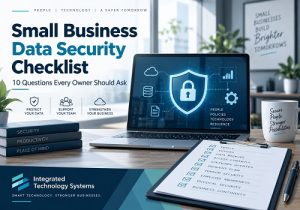
 Small business data security starts with knowing where your biggest risks are. You do not need to be a cybersecurity expert, but you should understand how your company protects customer information, financial records, email accounts, cloud files, passwords, and other sensitive data.
A practical data security checklist can help you identify gaps before they become serious problems. Start by asking these 10 questions about your current technology and security practices.
Data Security Checklist
- Are Our Backups Recent, Automatic, and Tested?
Having a backup is not enough. Your business should know what data is being backed up, how often backups occur, where copies are stored, and whether the information can actually be restored.
Ask when the last recovery test was performed. A backup that has never been tested may fail when you need it most.
- Does Everyone Who Needs It Use Multi-Factor Authentication?
Multi-factor authentication, or MFA, adds another verification step beyond a password. It should be enabled on important systems such as email, cloud storage, accounting software, remote-access tools, and administrative accounts.
For stronger small business data security, prioritize MFA anywhere an unauthorized login could expose sensitive information.
- Do Employees Have More Access Than They Need?
Employees should generally have access only to the files and systems required for their jobs. Someone in marketing, for example, may not need unrestricted access to payroll or accounting records.
Review permissions regularly. Limiting access helps secure business data if an account is compromised.
- Are Former Employees Completely Removed From Our Systems?
When an employee or contractor leaves, access should be removed promptly. That includes email, cloud platforms, shared drives, VPN accounts, software subscriptions, password managers, and building access systems connected to your network.
An offboarding checklist can prevent forgotten accounts from becoming security risks.
- How Well Is Our Business Email Protected?
 Email remains a common way for attackers to target businesses through phishing, fake invoices, malicious links, and fraudulent password-reset requests.
Strong business cybersecurity should include spam filtering, MFA, employee awareness, and procedures for verifying unusual payment or account requests.
- Are Computers and Software Updated Promptly?
Software updates frequently include security patches for known vulnerabilities. Delaying updates can leave systems exposed even when a fix is already available.
Businesses should have a clear process for updating computers, servers, browsers, mobile devices, firewalls, and commonly used applications.
- Who Can Access Our Cloud Files?
Cloud platforms make collaboration easier, but permissions can become difficult to manage over time. Review shared folders, public links, administrator accounts, and third-party applications connected to cloud services.
Good data protection includes knowing exactly who can view, edit, download, or share important information.
- Do Employees Know How to Recognize Security Threats?
Technology alone cannot stop every threat. Employees should understand how to identify suspicious emails, unexpected login requests, unusual attachments, fake invoices, and requests for confidential information.
Short, regular training sessions can be more effective than treating cybersecurity as a once-a-year topic.
- Do We Know What to Do if a Security Incident Happens?
Every business should have a basic incident response plan. Employees should know who to contact, which systems may need to be disconnected, how affected accounts should be secured, and how backups can be accessed.
Planning these steps before an incident can reduce confusion during an emergency.
- Do Outside Vendors Have Access to Our Systems?
IT providers, software vendors, accountants, contractors, and other third parties may have access to company systems or information.
Review which vendors have access, what permissions they hold, and whether old vendor accounts still exist. Third-party access should receive the same attention as internal employee access.
Turn Your Data Security Checklist Into an Action Plan
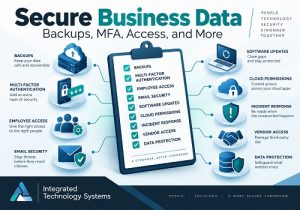
Effective small business data security is not a single product or setting. It requires backups, controlled access, secure accounts, updated technology, trained employees, and a clear response plan.
Integrated Technology Systems can help businesses evaluate existing technology, identify security gaps, review access controls, and prioritize improvements based on actual business risks.
If several questions on this checklist are difficult to answer, call Integrated Technology Systems to discuss where your business should start.
Integrated Technology Systems
6 East 45th Street, Suite 400
New York, NY 10017
212-750-5420
https://www.itsnyc.com


