


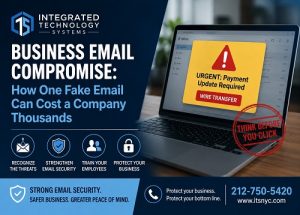
 A single convincing email can create a serious financial loss for a business. Business email compromise happens when criminals impersonate executives, employees, vendors, or trusted partners to trick someone into sending money, changing payment details, or revealing sensitive information. Unlike many cyberattacks, these scams often do not rely on complicated malware. Instead, attackers exploit trust, urgency, and normal business processes.
For companies that depend heavily on email for invoices, approvals, vendor communication, and financial transactions, the risk can be significant. Integrated Technology Systems helps businesses strengthen email security, protect user accounts, and build procedures that make fraudulent requests easier to identify before money or information leaves the organization.
What Is Business Email Compromise?
Business email compromise, often called BEC, is a form of targeted email fraud. An attacker studies a company, identifies employees with access to financial information or payment authority, and then creates a message that appears legitimate.
The fraudulent email may seem to come from:
- A company owner or executive
- A manager requesting an urgent payment
- A vendor asking to update banking information
- An employee requesting a payroll change
- An attorney or business partner handling a transaction
- A familiar supplier sending an invoice
In some cases, attackers create an email address that looks almost identical to a real one. In others, they gain access to an actual employee account and send messages directly from the legitimate mailbox.
That second scenario can be especially dangerous because the message may appear inside an existing email conversation.
Why One Fake Email Can Be So Convincing
Modern phishing attempts can be far more sophisticated than the poorly written scam emails businesses may remember from years ago.
Criminals can research employees through company websites, LinkedIn profiles, social media, press releases, and other public information. They may learn who handles accounting, who approves purchases, which vendors a company works with, and when executives are traveling.
They can then create a message that fits a normal business situation. For example, an accounting employee might receive an email that appears to come from the company president:
“I need this wire transfer completed before the end of the day. I am going into a meeting, so please handle it right away.”
The request sounds urgent. It appears to come from a trusted person. The employee wants to help. That combination is exactly what the attacker is counting on.
Business Email Compromise Often Targets Payments
Financial transactions are among the most common targets because they can produce an immediate payoff for criminals.
Consider a company that regularly pays a vendor through electronic transfer. An attacker may impersonate that vendor and send a message saying its banking information has changed.
The email might include a new routing number and account number along with a convincing explanation.
If the accounting department processes the change without independent verification, the next legitimate payment could be sent directly to the attacker.
Depending on the size of the invoice, one fraudulent request could cost thousands or even tens of thousands of dollars. Recovering those funds can also be difficult once the money has been transferred.
Attackers May Target Payroll and Employee Accounts
Payment fraud is not the only concern.
Attackers may also impersonate employees and ask human resources to change direct deposit information. The next paycheck is then deposited into an account controlled by the criminal.
Other scams may request:
- W-2 information
- Employee tax documents
- Customer records
- Login credentials
- Confidential contracts
- Gift card purchases
- Password resets
This means email compromise can create both financial and data-security problems. A successful attack may also give criminals additional information they can use in future scams.
How Business Email Compromise Starts
There are several ways attackers can begin a BEC campaign.
One common method is phishing. An employee receives a fake Microsoft 365 or email login page and unknowingly enters a username and password.
Once an attacker gains access to the mailbox, they may quietly monitor email conversations for days or weeks.
They can learn:
- Who authorizes payments
- When invoices are usually paid
- Which vendors communicate with accounting
- How executives normally write emails
- When important transactions are scheduled
The attacker may even create mailbox rules that hide certain messages or automatically forward copies of email.
When the right opportunity appears, the criminal inserts a fraudulent request into the conversation.
Warning Signs Employees Should Watch For
Many BEC attacks create subtle warning signs.
Employees should become cautious when an email involves an unexpected change involving money, credentials, or confidential information.
Possible warning signs include:
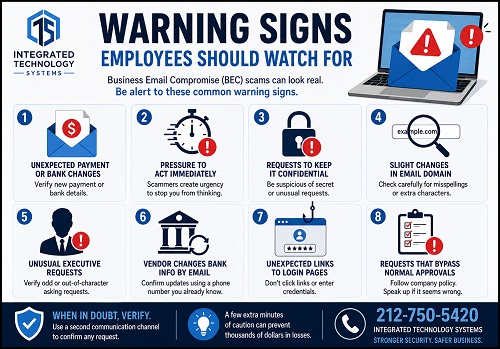 A sudden request to change payment instructions
- Pressure to act immediately
- Requests to keep a transaction confidential
- Slight changes in an email domain
- An executive requesting an unusual purchase
- A vendor changing banking information by email
- Unexpected links to login pages
- Requests that bypass normal approval procedures
However, companies should not rely entirely on employees spotting suspicious messages.
Security technology and clear business procedures should work together.
Require Verification Before Financial Changes
One of the most effective defenses against email fraud is surprisingly simple: verify important financial requests through a separate communication channel.
For example, if a vendor emails new banking instructions, an employee should call the vendor using a phone number already stored in company records - Do not use a phone number supplied in the suspicious email.
The same approach should apply to unusual wire transfers, payroll changes, or large purchases.
Companies can also require two employees to approve transactions above a certain dollar amount.
These controls make it much harder for one convincing email to trigger a major financial loss.
Strengthen Email Security With Multiple Layers
Businesses should use several security measures rather than relying on a single tool.
Effective protections may include:
- Multi-factor authentication
- Advanced spam and phishing filtering
- Email authentication technologies
- Secure password policies
- Conditional access controls
- Suspicious login monitoring
- User security awareness training
- Regular account reviews
- Reliable data backups
Multi-factor authentication is particularly important because a stolen password alone may not be enough for an attacker to access an employee account.
Integrated Technology Systems can also help businesses review Microsoft 365 environments, email configurations, account permissions, and security policies to identify weaknesses before attackers exploit them.
Employee Training Still Matters
Technology can stop many suspicious emails, but employees remain an important part of the defense.
Security training should teach staff to slow down when an email creates unusual urgency.
Employees should know that verifying a request is not an inconvenience. It is part of protecting the company.
Training should include realistic examples involving:
- Fake executive requests
- Vendor invoice scams
- Password reset emails
- Payroll changes
- Malicious attachments
- Fraudulent login pages
Companies should also make it easy for employees to report suspicious messages without worrying that they are wasting someone's time.
Early reporting can prevent a small incident from becoming a much larger one.
What Should You Do If a Suspicious Payment Was Sent?
Speed matters when a fraudulent payment occurs.
The company should immediately notify its financial institution and ask whether the transfer can be stopped or recalled.
The IT team should also investigate whether an email account was compromised.
That investigation may include reviewing:
- Recent login activity
- Unknown devices
- Inbox forwarding rules
- Password changes
- Multi-factor authentication settings
- Deleted email
- Suspicious sent messages
Affected passwords should be changed, active sessions should be terminated, and compromised accounts should be secured.
The company should also determine whether other employees or customers received fraudulent messages from the compromised account.
Business Email Compromise Is a Business Risk, Not Just an IT Problem
Email fraud succeeds because it combines technology with human behavior and normal business processes.
That means preventing it requires cooperation between IT, accounting, management, human resources, and employees.
A strong security strategy should answer important questions before an incident occurs:
- Who can approve wire transfers?
- How are banking changes verified?
- What happens when an executive makes an unusual request?
- How quickly can a compromised account be disabled?
- Who investigates suspicious email activity?
Companies that establish these procedures in advance are better prepared when a suspicious message appears.
Protect Your Business Before the Next Fake Email Arrives
Cybercriminals do not need to hack an entire network to cause financial damage. Sometimes they only need one believable email and one rushed employee.
Strong email security, multi-factor authentication, employee training, payment verification procedures, and professional monitoring can dramatically reduce the risk.
Integrated Technology Systems provides IT support and cybersecurity solutions designed to help businesses protect their email, accounts, data, and financial processes.
If your organization wants to reduce the risk of email fraud and strengthen its overall cybersecurity posture, call Integrated Technology Systems to discuss your current email security and IT environment.
Integrated Technology Systems
6 East 45th Street, Suite 400
New York, NY 10017
212-750-5420
https://www.itsnyc.com


