


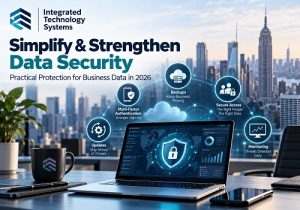
 Protecting business data has become more complicated, but a strong data security strategy does not have to be. Businesses now store information across cloud platforms, employee devices, email systems, software applications, and remote work environments. Each connection can create another opportunity for unauthorized access.
The goal should not be to add security tools simply because they are available. Instead, businesses should build layers of protection around their most important information while making security practices manageable for employees.
For small and midsize businesses, that means focusing on a few high-impact areas:
- identity protection
- access control
- backups
- software updates
- employee awareness
- cloud security
- preparation for a security incident
Start With the Data You Need to Protect
Before buying another cybersecurity product, identify what information would cause the greatest damage if it were stolen, changed, deleted, or made unavailable.
That could include
- customer records
- financial information
- employee data
- contract
- intellectual property
- email accounts
- cloud file
- login credentials
Next, determine where that information is stored and who can access it. This simple inventory can reveal forgotten accounts, excessive permissions, outdated applications, and data stored in locations that no longer make sense.
Data security becomes easier to manage when a business knows exactly what it is protecting.
Strengthen Identity Security With MFA
Passwords remain important, but passwords alone should no longer be considered sufficient protection for sensitive business accounts.
Multi-factor authentication (MFA) adds another verification step when someone signs in. Whenever available, businesses should consider phishing-resistant MFA methods because they provide stronger protection against attackers attempting to steal or reuse credentials.
Priority accounts should include email, cloud storage, financial systems, administrative accounts, remote access tools, and other systems containing sensitive information.
Password managers can also help employees create and maintain strong, unique passwords rather than reusing the same credentials across multiple accounts.
Limit Access to Business Data
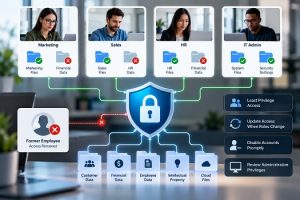 Not every employee needs access to every file or system.
Businesses can reduce risk by following the principle of least privilege. Employees should receive only the access necessary to perform their jobs.
Permissions should also change when an employee changes roles. When someone leaves the company, accounts and access privileges should be disabled promptly.
Administrative accounts deserve additional attention because an attacker who gains administrator privileges may be able to reach a much larger portion of the company's systems.
Protect and Test Your Backups
Backups remain one of the most important parts of business data protection. However, simply having a backup is not enough.
Businesses should maintain reliable backups of critical information and protect those backups from unauthorized changes or deletion. At least one backup copy should be sufficiently separated from the primary environment so that an attack on the main network does not automatically compromise the backup.
Just as importantly, test the recovery process.
A backup provides limited value if nobody knows whether the files can actually be restored when they are needed.
Keep Software and Devices Updated
Attackers frequently look for known vulnerabilities in outdated software, operating systems, network equipment, and applications.
Businesses should establish a regular patch-management process instead of relying on employees to remember individual updates. Automatic updates can help where appropriate, while critical systems may require a more controlled testing and deployment process.
Do not forget network equipment, firewalls, routers, remote access tools, and other devices. Older hardware and unsupported software can create security gaps even when computers are fully updated.
Make Employee Training Part of Data Security
Technology alone cannot protect a business.
Phishing and social engineering continue to target employees because attackers know that convincing someone to provide credentials or approve an action can sometimes be easier than breaking through a technical security control.
Training should go beyond telling employees not to click suspicious links. Employees should learn how to recognize unusual login requests, fake invoices, unexpected password resets, impersonation attempts, suspicious attachments, and requests involving money or sensitive information.
They should also know exactly how to report something suspicious.
Secure Cloud Applications and Remote Access
Cloud services can improve productivity, but they also change where business information is stored and how employees access it.
Businesses should regularly review cloud permissions, unused accounts, file-sharing settings, administrator privileges, and third-party application connections.
Remote workers also need appropriate security controls. Company-managed devices, encryption, endpoint protection, secure Wi-Fi practices, MFA, and properly configured remote-access solutions can help reduce risk.
A VPN can still play a role in some environments, but it should not be treated as a complete data security strategy by itself.
Pay Attention to Third-Party Access
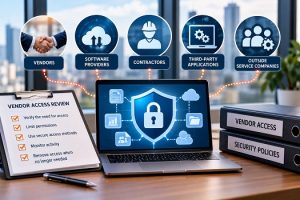 Vendors, contractors, software providers, and outside service companies may need access to business systems or data.
That access should be reviewed just as carefully as employee access.
Businesses should understand what information a vendor can reach, how the vendor protects it, and whether access is still necessary. Accounts created for a temporary project should not remain active indefinitely.
Vendor access should also be included when reviewing permissions and preparing an incident response plan.
Have an Incident Response Plan Before You Need It
No security strategy can guarantee that an incident will never happen. Therefore, businesses need to know what they will do if something goes wrong.
A basic incident response plan should identify who is responsible for responding, which systems should be isolated, who needs to be notified, where backups are located, and how normal operations will be restored.
Important contact information should be available even if the company's normal network or email system becomes unavailable.
Testing the plan can uncover problems before a real incident occurs.
Data Security Requires Continuous Improvement
Cybersecurity is not a project that businesses complete once and forget.
- Technology changes.
- Employees come and go.
- New applications are added.
- Vendors change.
- New vulnerabilities are discovered.
As a result, businesses should regularly review security policies, accounts, permissions, backups, software, devices, and incident response procedures.
The NIST Cybersecurity Framework 2.0 provides a useful way to think about this process through six functions: Govern, Identify, Protect, Detect, Respond, and Recover.
For a small business, the important point is simple: understand your risks, put appropriate safeguards in place, watch for problems, and be prepared to respond and recover.
Simplify Data Security With the Right IT Strategy
Strong cybersecurity does not necessarily mean making technology harder for employees to use. In fact, well-designed security can make systems easier to manage by standardizing access, updates, backups, monitoring, and response procedures.
Integrated Technology Systems helps businesses evaluate their existing IT environment, identify security gaps, and develop practical protections for business data.
Instead of waiting for a data breach, ransomware attack, or account compromise to reveal weaknesses, take a proactive approach.
Call Integrated Technology Systems at 212-750-5420 to discuss ways to strengthen your company's data security and IT infrastructure.
Integrated Technology Systems
6 East 45th Street, Suite 300
New York, NY 10017
212-750-5420


